Power Connection
Connecting the FizzWizz power supply, confirming the green power light, and adding battery backup for sites with unreliable power.
Power connection
The FizzWizz runs from a plug-in wall-wart power supply. A green light on the supply confirms it is working.
Power the unit OFF before connecting or disconnecting any hoses, sensors, or the power supply itself. The Health Check procedure is built around this rule.
Connecting power
Check the power switch is off
Ensure the FizzWizz power is OFF before connecting anything.
Connect the barrel connector
Plug the power supply's barrel connector into the FizzWizz power input. Push it fully home — a barrel connector that is not fully seated is a common cause of an apparent power failure.
Plug into a live outlet
Connect the power supply to a live mains outlet.
Confirm the green light
The green power light on the supply should illuminate.
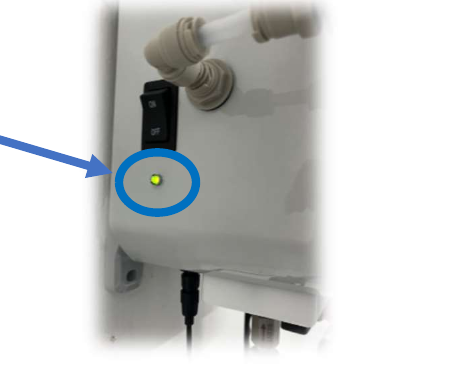
The green light confirms the power supply is functional.
If the green light is off
Work through these in order before assuming the power supply has failed:
- Confirm the outlet is live — test it with another device.
- Confirm the barrel connector is fully seated in the FizzWizz.
- If the light is still off, replace the plug-in power supply.
This is Health Check Check 1. See Setup & Power Check for how it fits into the full sequence, and By Symptom for the recorded actions if it fails.
Adding battery backup
On a site where brownouts or short power cuts are common, a Battery Backup keeps the unit running for approximately 1 hour on a full charge.
The battery backup sits between the power supply and the FizzWizz:
- The FizzWizz power supply plugs into the power supply connection on the battery pack.
- The battery pack's 5 ft output cable plugs into the FizzWizz power input.
While mains power is available, the power supply runs the FizzWizz and trickle charges the battery. A full charge from empty takes approximately 12 hours.
The battery backup is intended for short interruptions only. It is not a substitute for a reliable mains supply during longer outages, and runtime depends on the operating mode the unit is in.
See Battery Backup for the full installation procedure.
What a power interruption does
A brief power loss stops carbonation until power returns. The FizzWizz is not damaged by a short outage, and it resumes operation when power is restored.
A longer outage matters because carbonation is a function of temperature and pressure held over time. If the tank warms or the pressure drops while the unit is offline, the finish pressure required changes — the FizzWizz recalculates when it comes back, but the batch may need longer.
If a device stops reporting after a power event, see Device Offline or Not Reporting.
Next step
CO₂ Supply Connection
Connect the CO₂ supply and set the regulator.